
What is a VPN?
A VPN (virtual private network) creates an encrypted tunnel between your device and a VPN server. Everything you do online travels through that tunnel, so the network you're on can't see it, and websites see the VPN server's IP address instead of yours.
- 2-minute read
- 30-second video
- No jargon
Read the transcript
Without a VPN, the Wi-Fi you're on and your internet provider can see every site you visit. And every website sees your real IP address, and roughly where you are.
A VPN wraps your traffic in an encrypted tunnel to a VPN server. Anyone watching the network sees only scrambled data, not the sites you visit. Websites see the VPN server's IP address, not yours.
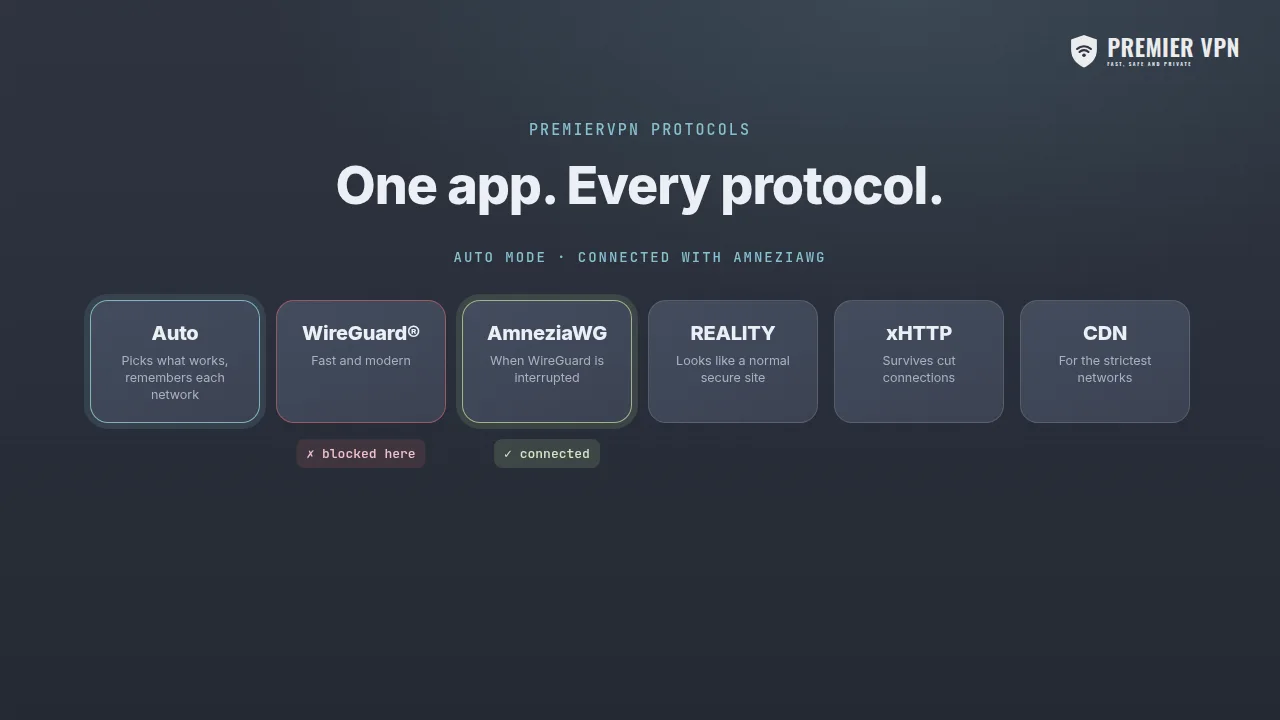
PremierVPN's Auto mode tries each protocol (WireGuard®, AmneziaWG, REALITY, xHTTP and CDN) and keeps the one that works on your network. Protected in one tap.
A VPN is a service that encrypts your internet connection and routes it through a server run by the VPN provider. It does two things: it hides what you do from the network you're connected to (public Wi-Fi, your internet provider), and it hides your real IP address from the websites and apps you use.
What changes when you connect
Without a VPN
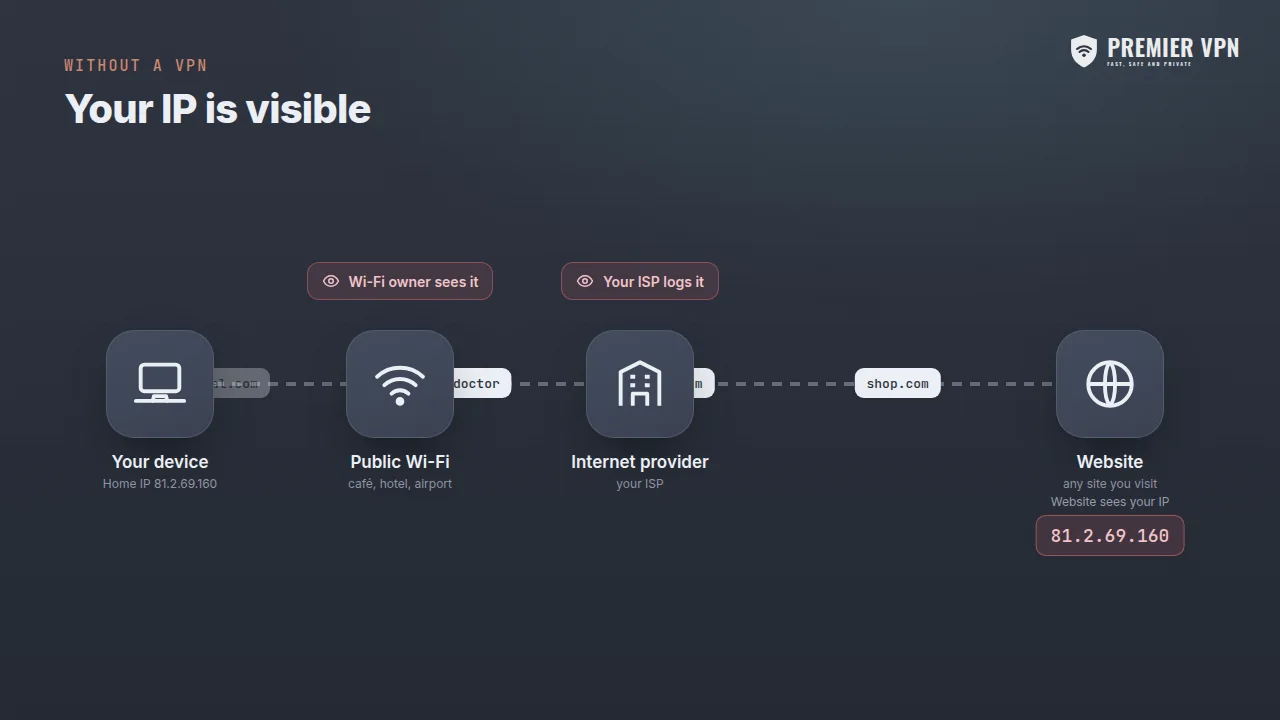
- Your Wi-Fi provider and ISP can see which sites you visit
- Websites and apps see your real IP address and rough location
- On public Wi-Fi, others on the network can watch your traffic
- Your ISP can log, profile or slow down what you do
With PremierVPN
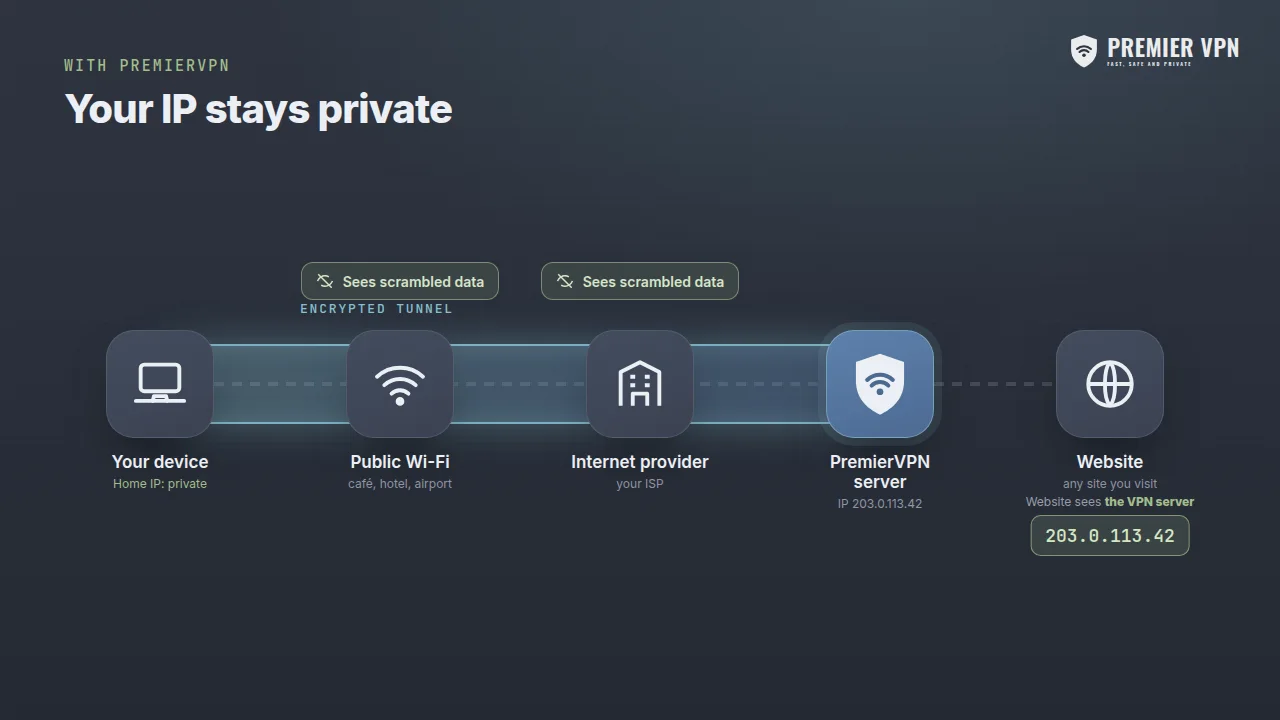
- Everything between you and the VPN server is encrypted
- Wi-Fi owners and your ISP see only scrambled data
- Websites see the VPN server's IP address, not yours
- DNS lookups stay inside the tunnel too
What happens when you tap Connect
Your app connects to a server
The PremierVPN app opens a connection to a VPN server in the location you choose, and the two agree on encryption keys.
Your traffic is encrypted
Everything your device sends is encrypted before it leaves, using modern ciphers such as ChaCha20-Poly1305 or TLS 1.3. Only the VPN server can decrypt it.
The server forwards it
The VPN server decrypts your traffic and sends it on to the website or app. Replies come back the same way, encrypted all the way to your device.
Websites see the server
Because requests arrive from the VPN server, sites see its IP address and location, not yours. Your network sees only a single encrypted connection.
What a VPN does, and doesn't, protect
A VPN is one important layer of privacy. Knowing where it stops helps you use it well.
A VPN protects you from
- Snooping on public Wi-Fi in cafés, hotels and airports
- Your internet provider seeing and logging the sites you visit
- Websites, apps and advertisers seeing your real IP address
- DNS lookups leaking outside the encrypted connection
- Some types of traffic-based throttling by your ISP
A VPN doesn't stop
- Tracking by accounts you're logged in to, such as Google or Facebook
- Cookies and browser fingerprinting
- Malware, or phishing sites you choose to enter details into
- Websites seeing what you do on the website itself
Pair a VPN with good habits: keep devices updated, use a password manager and turn on two-factor authentication. Our fingerprint test shows what your browser gives away.
When should you use a VPN?
Public Wi-Fi
Cafés, hotels, airports and trains. You don't know who runs the network or who else is on it.
At home
Stop your internet provider building a record of every site you visit, or slowing particular kinds of traffic.
Working remotely
Keep work traffic private on any network. A dedicated IP lets you get onto company allow-lists.
Travelling
Keep using the networks you rely on safely, wherever you connect from.
Banking and shopping
Add a layer of protection on networks you don't control when handling money.
Gaming
Keep your home IP private from other players, and reduce the risk of DDoS attacks against your connection.
The different ways a VPN connects
A protocol is the method a VPN uses to build its tunnel. Some are built for speed, others for networks that interfere with VPN connections. PremierVPN includes all of these on every plan.
| Protocol | What it is | Best for |
|---|---|---|
| Auto PremierVPN apps | Tries each protocol in turn, keeps the first that works and remembers it for that network. | Everyone |
| WireGuard® | A modern, lean protocol using ChaCha20-Poly1305 encryption. | Speed on most networks |
| AmneziaWG New | WireGuard® tuned for networks that interrupt standard VPN connections. | When WireGuard won't connect or keeps dropping |
| VLESS + REALITY | Looks like an ordinary secure (TLS 1.3) website connection. | Restrictive networks |
| xHTTP | VLESS over HTTP with REALITY, split into ordinary web requests. | Networks that cut long-running connections |
| CDN New | VLESS routed through a content delivery network. | The most restrictive networks |
| Stealth relay | WireGuard® inside an encrypted TLS connection. | Networks with strict traffic policies |
| OpenVPN · IKEv2 | Long-established protocols built into many routers and operating systems. | Routers and manual set-ups |
What to look for
A VPN provider can see the traffic that leaves its servers, so who you trust matters. Here's what we think every good VPN should offer, and how PremierVPN does it.
A real no-logs policy
We don't log the sites you visit, your DNS lookups or your traffic. Read our policy.
A kill switch
Blocks internet traffic if the VPN drops, so nothing slips out unprotected.
DNS leak protection
Keeps every website lookup inside the encrypted tunnel, with your choice of resolver.
Modern protocols
WireGuard® for speed, plus AmneziaWG and VLESS for networks that push back.
Apps for every device
iPhone, iPad, Android, Windows, macOS and Linux, all on one account.
People you can reach
UK-based support, available 24/7, and a 30-day money-back guarantee.
Common questions
What does VPN stand for?
Virtual private network. It creates a private, encrypted connection (the "tunnel") across a public network such as the internet or a café Wi-Fi.
Is using a VPN legal?
In the UK, US, EU and most countries, yes. A few countries restrict or regulate VPNs, so check the rules where you are. Using a VPN doesn't make anything illegal become legal.
Does a VPN slow down my internet?
Slightly, because traffic travels via the VPN server and is encrypted. With a modern protocol like WireGuard® and a nearby server, most people don't notice the difference. Occasionally a VPN is faster, if your ISP was slowing certain traffic.
Can my internet provider see that I'm using a VPN?
Usually it can see that you're connected to a VPN server, but not what you do through it. Protocols such as VLESS with REALITY are designed to look like ordinary secure web traffic.
Does a VPN make me anonymous?
No VPN makes you completely anonymous. It hides your traffic from your network and your IP from websites, but accounts you log in to, cookies and browser fingerprints can still identify you.
Do I need a VPN at home?
It's worth it if you don't want your internet provider to see and log the sites you visit, or if you want to keep your home IP private from sites, apps and other players.
Which VPN protocol should I use?
In PremierVPN's apps, leave it on Auto and it picks for you. Otherwise start with WireGuard®; if it won't connect, try AmneziaWG, then VLESS with REALITY, xHTTP or CDN.
Is a free VPN good enough?
Running VPN servers costs money, so free VPNs often pay their way with ads, data collection or tight limits. Check what a free service does with your data before trusting it with your traffic.
Protected in one tap
Set up PremierVPN in under two minutes. Every plan includes every protocol, a kill switch, zero logs and a 30-day money-back guarantee.