9 min read
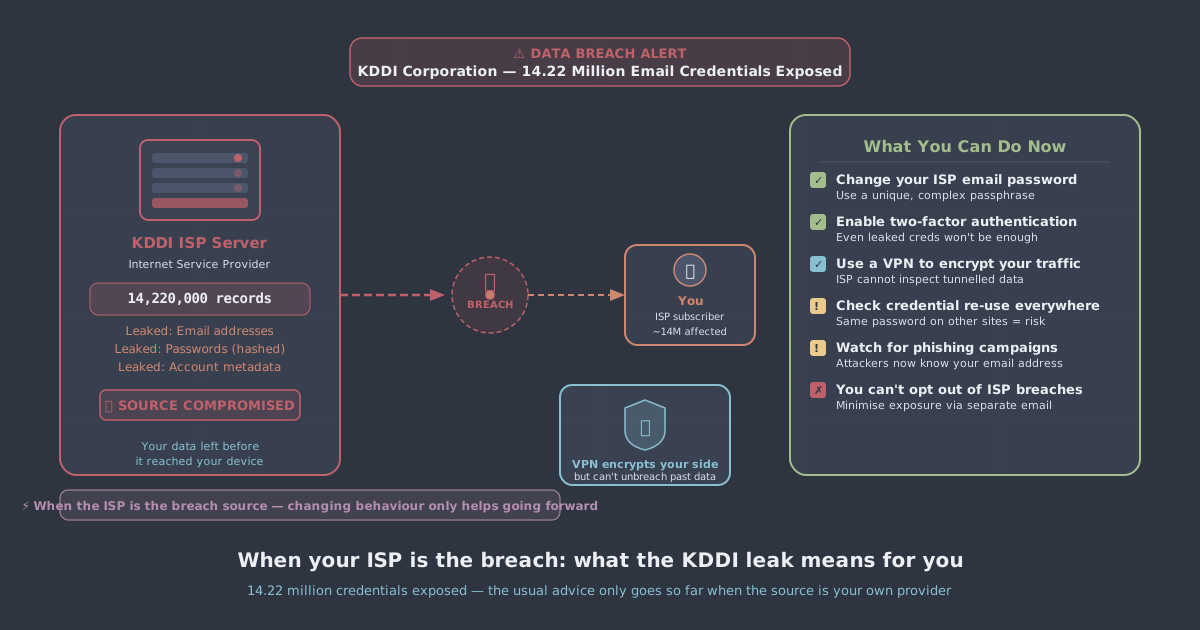
On 17 June 2026, KDDI Corporation—one of Japan's largest telecoms groups—detected unauthorised access to a shared email platform it operates on behalf of six internet service providers: STNet, KDDI Web Communications, JCOM, Chubu Telecommunications, NIFTY, and BIGLOBE. By the time KDDI disclosed the breach publicly on 23 June, the damage was already done. Up to 14.22 million email addresses and passwords may have been exposed, covering current, former, and even dormant accounts. Japan's Ministry of Internal Affairs and Communications ordered a formal report under the Telecommunications Business Act by 6 July 2026.
The scale alone makes this one of the largest email credential breaches in Japanese history. But the detail that deserves more attention is not the number—it is the source. The organisation that leaked these credentials was not a social media platform or an online retailer. It was the infrastructure provider sitting at the very centre of millions of people's internet connections. That changes the nature of the risk considerably.
This article looks at what the KDDI breach actually exposed, why an ISP breach is a different category of problem, and what practical steps you can take to reduce your exposure—including why encrypting your traffic at the network level matters more than most people realise.
What KDDI actually exposed
Attackers exploited a vulnerability in unnamed third-party software embedded in KDDI's shared email infrastructure. Because that infrastructure served six separate ISPs through a single shared platform, a single point of failure became a single point of mass exposure.
The credential picture is troubling in a specific way. KDDI acknowledged that only some passwords were stored in hashed or encrypted form. The company declined to specify how many were held in plaintext or what hashing algorithm was used for the remainder. In practical terms, that means:
- Some proportion of the 14.22 million passwords may be immediately usable by whoever obtained them.
- Even hashed passwords are crackable if the algorithm was weak (MD5 or unsalted SHA-1, for instance) or if users chose common passwords.
- Dormant accounts—which KDDI confirmed are included—are often the most dangerous, because users are least likely to notice unexpected activity on them.
KDDI is urging all affected customers to reset passwords immediately and enable two-factor authentication. That is sound advice, and if you hold accounts with any of the six affected ISPs, you should act on it now. But it addresses the symptom rather than the underlying structural problem.
Why an ISP breach is different
When a retail website or a gaming platform suffers a breach, your exposure is largely contained to that service. Change your password there, check whether you reused it elsewhere, move on. The breach is unfortunate but bounded.
An ISP is not a bounded service. It is the pipe through which all of your internet traffic flows. Your ISP—or in KDDI's case, a shared infrastructure platform operated on behalf of multiple ISPs—sits in a privileged position. It sees your DNS queries, the IP addresses you connect to, the volume and timing of your traffic, and, where connections are unencrypted, the content itself.
This means an ISP breach can expose two distinct categories of data:
- Account credentials—email addresses and passwords, as in the KDDI case. These are stolen in a point-in-time attack and are immediately actionable by criminals.
- Traffic metadata and content—the ongoing record of what you do online, which your ISP accumulates simply by routing your connection. This data does not need to be stolen in a dramatic breach; it is collected continuously, and its exposure depends entirely on how well the provider secures and limits access to it.
The KDDI breach is category one. But it is a sharp reminder that category two exists, and that the organisation holding it is the same one that just demonstrated it cannot always protect what it stores.
Credential hygiene: the immediate response
Whatever else you do, the credential response is non-negotiable. If you are affected by the KDDI breach—or any email credential breach—work through this list:
- Reset the affected password immediately. Use a long, randomly generated password. A password manager makes this straightforward.
- Check for reuse. If you used the same password on any other account, reset it there too. Credential stuffing attacks—where stolen username/password pairs are tried across many services—are automated and fast.
- Enable two-factor authentication (2FA) on the compromised account and on any high-value accounts that share the same email address as a login identifier.
- Watch for phishing. Attackers who obtain email addresses often follow up with targeted phishing. Be sceptical of any email asking you to verify credentials or click a link, particularly in the weeks after a known breach.
- Check dormant accounts. If you have old ISP email addresses you no longer actively use, check whether they are affected and whether they are used as a recovery address for other services.
You can also run your email addresses through our leak test tool to check for other known exposures.
The structural problem: trusting your ISP with unencrypted traffic
Password resets deal with the credential breach. They do nothing about the broader question of what your ISP can see, store, and potentially expose.
In most countries, ISPs are legally permitted—and in some cases required—to retain metadata about their customers' internet activity. In the UK, the Investigatory Powers Act mandates that ISPs retain connection records for twelve months. In Japan, the situation is governed by the Telecommunications Business Act, the same law under which KDDI has now been ordered to report. Retention requirements vary, but the pattern is consistent: ISPs hold significant data about you, and that data is only as safe as their security practices.
A VPN addresses this at the network level. When you route your connection through an encrypted VPN tunnel, your ISP sees only that you are connected to a VPN server—not the DNS queries you make, not the services you connect to, not the content of unencrypted traffic. The traffic that would otherwise be visible to your ISP is encrypted before it leaves your device.
This is not a theoretical benefit. It is a direct response to the structural position your ISP occupies. If the organisation routing your traffic cannot be relied upon to secure everything it stores about you, the practical answer is to limit what it can see in the first place.
What to look for in a VPN, given this threat model
Not every VPN arrangement offers the same protection. A few things matter specifically when your concern is ISP-level exposure:
A verified no-logs policy
A VPN that logs your traffic simply moves the trust problem from your ISP to your VPN provider. The policy needs to be genuine and, ideally, independently verified. PremierVPN operates a strict no-logs policy—we do not record which sites you visit, what you download, or when you connect.
Strong, modern protocols
The encryption is only as good as the protocol carrying it. WireGuard is PremierVPN's default protocol: it is fast, lean, and uses well-audited cryptographic primitives. OpenVPN remains a solid choice where compatibility matters. For networks that actively interfere with VPN traffic—relevant if you travel to countries with restrictive internet policies—VLESS+REALITY via PremierVPN X is designed to resist deep packet inspection.
A kill switch
If the VPN connection drops unexpectedly, a kill switch prevents your traffic from falling back to your ISP unencrypted. This is a basic safeguard that should be enabled by default.
DNS leak protection
DNS queries are one of the most revealing things your ISP can observe—every domain name you look up is logged before you even make a connection. A properly configured VPN routes DNS queries through the encrypted tunnel so your ISP never sees them.
Getting set up
PremierVPN has apps for all major platforms. If you are on Windows, the Windows app takes a few minutes to install and configure; there is also a step-by-step setup guide if you want to walk through it. macOS, iOS, Android, Ubuntu, and Fire TV are all supported—links to each app are in the navigation.
For day-to-day use, the Personal VPN plan covers the essentials: WireGuard by default, kill switch, DNS leak protection, and access to servers across 12+ locations. If you need a consistent IP address—useful when you have services that whitelist by IP—a Dedicated IP gives you that without sharing an address with other users.
If you also want lightweight protection in the browser without running a full VPN client, PremierVPN Protect is a free extension currently live on Firefox, with Chrome support in review.
The practical takeaway
The KDDI breach is a concrete illustration of something worth keeping in mind: your ISP is not a neutral pipe. It is an organisation that stores data about you, runs software that can contain vulnerabilities, and operates at a scale that makes it an attractive target. The 14.22 million accounts caught in this breach were not compromised because their owners did anything wrong—they were simply customers of providers that shared infrastructure with a single point of failure.
Immediate credential hygiene—password resets, 2FA, checking for reuse—is the right first response to the KDDI breach specifically. But the longer-term response is to reduce what your ISP can see and store about you. Encrypting your traffic at the network level with a VPN that does not log what it sees is a practical, proportionate way to do that. It does not require trusting your ISP to protect data it no longer holds.